Show your bingo numbers on any TV
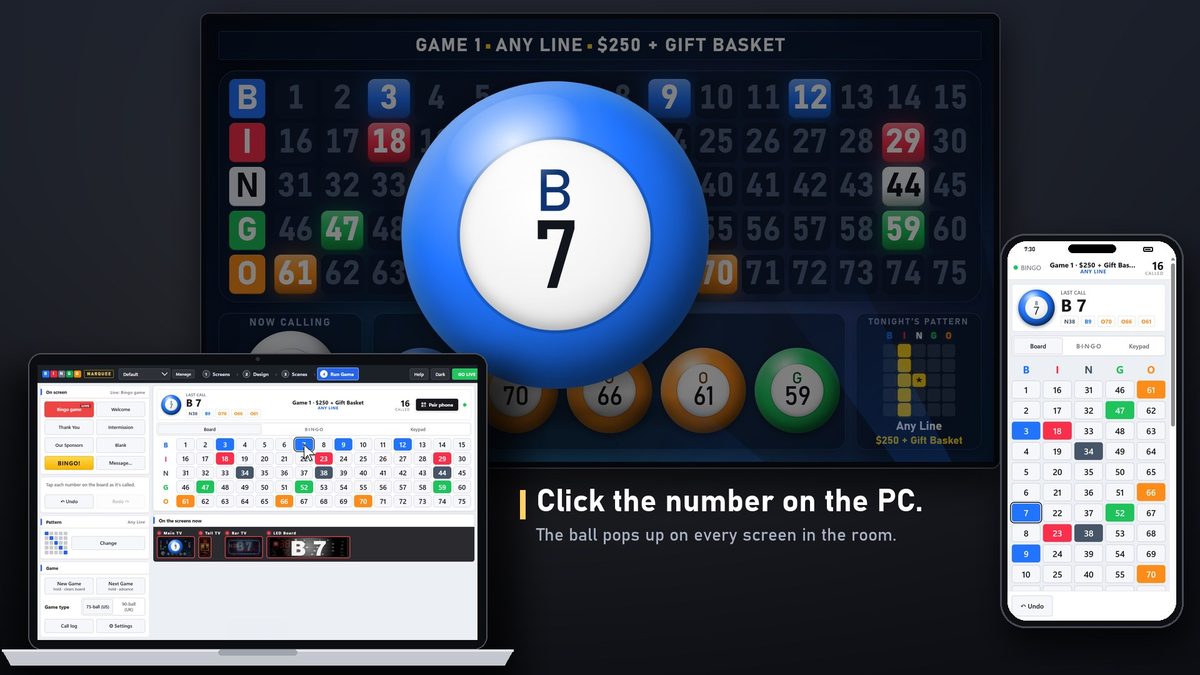
Bingo Marquee turns the TVs you already have into a bingo display. Every number you call pops up big on the screen with an animated reveal, then lights up on the board, so everyone in the room can follow along from the back table.
How it works
- Plug the TV into the bingo PC with an HDMI cable, like a second monitor. In Windows display settings, choose Extend (not Duplicate).
- Add the TV as a screen in Bingo Marquee and pick a look. There are 50 themes, from a classic bingo hall to a craft beer bar.
- Call your game. Draw the ball from your blower or cage as usual, then click the number on the PC or tap it on your phone. The TV shows it right away.
What players see on the TV
- The full 1–75 board (or 1–90), with every called number lit
- The current call, big, with a call animation the room can't miss
- The last few calls, the game number, the pattern and the prize
- A BINGO! celebration when someone wins
One TV or a whole room of them
Run several TVs from one PC, each with its own size, layout and theme. Two to four TVs side by side can also work as one big TV wall, with the board, the current call and the recent calls spread across them so no bezel cuts a number in half.
Questions
Does it work with a smart TV?
Yes. Any TV with an HDMI input works, smart or not. The TV just shows what the PC sends it.
What about a TV that's far from the PC?
Use a longer HDMI cable or an HDMI extender. Each screen also has a browser link, so a device on the same Wi-Fi can open that screen in its web browser.
Can I call from a phone instead of the PC?
Yes. Scan the code on the PC with your phone and it becomes the caller's board. The PC and phone stay in sync.
Try it free for 14 days Buy it for $349
One payment, no subscription. Windows 10 and 11. Works on two PCs.